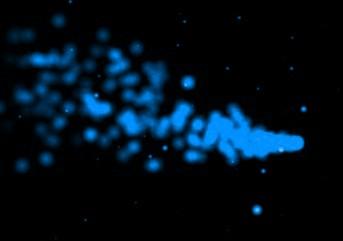
Particle engines are used a lot in 3D applications. Basically they can be defined by a large array of certain variables. X, Y, and Z coordinates are required. Increment variables for the X, Y, Z variables are also required.
Here's a simple example of the particle engine array:
#define MAX_PARTICLES
100   // Number of particles
typedef struct      // Create A Structure For Particle
{
  float life;  // Particle Life
  float fade;  // Fade Speed
  float x;  // X Position
  float y;  // Y Position
  float z;  // Z Position
  float xi;  // X Direction
  float yi;  // Y Direction
  float zi;  // Z Direction
}
particles;  // Particles Structure
particles particle[MAX_PARTICLES]; // Particle Array
Other variables could be put into the array easily, such as Red, Green, and Blue variables.
To initialize the particles, use this code:
int loop;
float V,Angle;
for (loop=0; loop<MAX_PARTICLES; loop++)    // Initializes All The Textures
{
  particle[loop].life=1.0f;      // Give All The Particles Full Life
   particle[loop].fade=float(rand()%100)/1000.0f+0.05f; // Random Fade Speed

  V = float(rand()%25);  // Speed of the particle
  Angle = float(rand()%360);  // Angle of the particle

  particle[loop].x = 0;  // Set X position
  particle[loop].y = 0;  // Set Y position
  particle[loop].z = 0;  // Set Z position

  particle[loop].xi = sin(Angle) * V;  // Set X velocity
  particle[loop].yi = cos(Angle) * V;  // Set Y velocity
  particle[loop].zi = float(((rand()%10)-5)/10) * V; // Set Z velocity
}
Finally, to draw the particles and animate them you will probably want to find a texture to use. I like to use a blurry texture that blends well. Use this code:
for (loop=0; loop<MAX_PARTICLES; loop++) // Loop Through All The Particles {
float x=particle[loop].x; // Grab Our Particle X Position float y=particle[loop].y; // Grab Our Particle Y Position float z=particle[loop].z; // Grab Our Particle Z Position
// Draw The Particle Using Our RGB Values, Fade The Particle Based On It's Life glColor4f(.5f,.5f,1.f,particle[loop].life);
glBegin(GL_TRIANGLE_STRIP); // Build Quad From A Triangle Strip glTexCoord2f(1,1); glVertex3f(x+0.2f,y+0.2f,z); // Top Right glTexCoord2f(0,1); glVertex3f(x-0.2f,y+0.2f,z); // Bottom Right glTexCoord2f(1,0); glVertex3f(x+0.2f,y-0.2f,z); // Top Left glTexCoord2f(0,0); glVertex3f(x-0.2f,y-0.2f,z); // Bottom Left glEnd(); // Done Building Triangle Strip
particle[loop].x+=particle[loop].xi/250; // Move On The X Axis By X Speed particle[loop].y+=particle[loop].yi/250; // Move On The Y Axis By Y Speed particle[loop].z+=particle[loop].zi/250; // Move On The Z Axis By Z Speed
// Slow down the particles particle[loop].xi*=.975; particle[loop].yi*=.975; particle[loop].zi*=.975;
particle[loop].life-=particle[loop].fade; // Reduce Particles Life By 'Fade'
if (particle[loop].life<0.05f) // If Particle Is Burned Out { particle[loop].life=1.0f; // Give It New Life particle[loop].fade=float(rand()%100)/7500 + 0.0075f; // Random Fade Value particle[loop].x= 0; // Center On X Axis particle[loop].y= 0; // Center On Y Axis particle[loop].z= 0; // Center On Z Axis V = (float((rand()%9))+1); Angle = float(rand()%360);
That's pretty much it. I know that you'll probably have questions even after looking at this. So I'm giving you a little example program so you can experiment with the engine. Download it here. I hope this helps you out. =)